Thursday, 5 August 2010

Telenet telemeter for iPhone/iPod

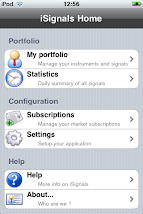
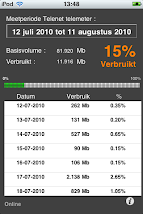
The telenet telemeter is now also available for the iPhone . Now also available for iPad
Some screenshots :


(Image below is from version 1.1, supports turbonet and fibernet)

Saturday, 31 July 2010

Drawing text on a pie chart (Cocoa)

Drawing text along side a pie chart (see image below) is fairly simple :


You only need a bit of math.

Let's look a some code :

First you have your text :

NSDictionary *attributes = [NSDictionary dictionaryWithObjectsAndKeys:[NSFont fontWithName:@"Helvetica" size:12], NSFontAttributeName,[NSColor blackColor], NSForegroundColorAttributeName, nil];

NSAttributedString * currentText=[[NSAttributedString alloc] initWithString: @"some text" attributes: attributes];


Then you need to figure out where you will put the text :

dot = NSMakePoint( size_x/2 + cos (PI * mid_angle / 180 ) * 50 , size_y/2 + sin ( PI * mid_angle / 180 ) * 50 ) ;

[greenPath appendBezierPathWithArcWithCenter: dot radius: 2 startAngle: 0 endAngle: 360 ] ;


(This is the dot you see in the picture above)


The mid_angle is the angle of slice divided by 2.


Then you draw the text :

textStartPoint = makeTextStartingPoint( [currentText size], bounds , mid_angle, 50 ) ;

[currentText drawAtPoint:textStartPoint];


The function makeTextStartingPoint looks like follows :


NSPoint makeTextStartingPoint( NSSize textSize, NSRect bounds , float angle, int offset )

{

NSPoint textStartPoint ;

float size_x = bounds.size.width ;

float size_y = bounds.size.height ;

float angle_radian = PI * angle / 180 ;

if ( angle <= 90 )

{

textStartPoint = NSMakePoint( size_x/2 + cos (angle_radian) * offset + 5 , size_y/2 + sin (angle_radian ) * offset ) ;

}

if ( angle > 90 && angle <= 180)

{

textStartPoint = NSMakePoint( size_x/2 + cos ( angle_radian ) * offset - textSize.width - 5 , size_y/2 + sin (angle_radian ) * offset ) ;

}

if ( angle > 180 && angle <= 270 )

{

textStartPoint = NSMakePoint( size_x/2 + cos ( angle_radian ) * offset - textSize.width - 5, size_y/2 + sin ( angle_radian ) * offset - textSize.height ) ;

}

if ( angle > 270 )

{

textStartPoint = NSMakePoint( size_x/2 + cos ( angle_radian ) * offset + 8 , size_y/2 + sin (angle_radian ) * offset - textSize.height ) ;

}

return textStartPoint ;

}


The reason I use an attributed string is because now I get the length of the text in pixels. You also see that the starting point is different from quadrant to quadrant.


Monday, 21 June 2010

iSignals v2.0.2

Version 2.0.2 of iSignals is finally landed !

It's now compatible with iOS4, contains a subscription store, contains a lot of technical analysis charts etc.

It still has the possibility to follow more than 17000 instruments on 28 markets. You can receive buy/sell signals (with paid subscription) but you can do your own technical analysis.

The application supports MACD, MFI, EMA, SMA,TMA, Parabolic SAR, Bollingerbands,ROC, RSI, Slow and fast stochastic, Williams %R and the Chaikin Osscilator?

Some screenshots :


Instruction video of iSignals : http://www.youtube.com/watch?v=fd9nrEr-r7E


Friday, 15 January 2010

a UISegmentedControl subclass that simulates checkboxes

I would like to share a small , possible, implementation of checkboxes on the iPhone using a UISegmentedControl subclass.

The UISegmentedControl is in fact a radiobutton over multiple possibilities, now in certain circumstances it could be usefull that you can select multiple items.
One possibility is to use a tableview, however in some cases this is overkill.

Suppose you have the following selection list :

In this list you want to be able to select multiple values like this (for example) :

Now to be able to do this , I wrote a small subclass of UISegmentedControl :

#import


@interface UIMultipleSelectionSegmentControl : UISegmentedControl  {


NSMutableSet  *indices ;

}

 @property( nonatomic,retain)   NSMutableSet *indices ;


@end


Now the trick is that you cannot use the private variables of the UISegmentedControl class, so the only possibility that one can use is to override the setSelectedSegmentIndex: and their do the actual implementation of multiple selections .

#import "UIMultipleSelectionSegmentControl.h"


@implementation UIMultipleSelectionSegmentControl


@synthesize indices ;


- (NSSet *) selectedSegmentIndices

{

return self.indices ;

}


- (void) setSelectedSegmentIndices: (NSSet *) aSet

{

NSEnumerator *enumerator = [aSet objectEnumerator];

NSNumber *value;

while ((value = [enumerator nextObject])) 

{

[self setSelectedSegmentIndex: [value integerValue]] ;

}


}


- (void) setSelectedSegmentIndex: (NSInteger) anIndex

{


if ( self.indices == nil ) self.indices = [NSMutableSet set] ;


if ( anIndex >= 0 )

{

NSNumber *indexNumber ;

UIImage *myImage ;

indexNumber = [NSNumber numberWithInt: anIndex] ;


if ( ! [self.indices containsObject: indexNumber] )

{

[self.indices addObject: indexNumber] ;

switch( anIndex )

{

case 0 :myImage = [UIImage imageNamed: @"segment-5-sel.png"] ; break ;

case 1 :myImage = [UIImage imageNamed: @"segment-10-sel.png"] ; break ;

case 2 :myImage = [UIImage imageNamed: @"segment-20-sel.png"] ; break ;

case 3 :myImage = [UIImage imageNamed: @"segment-50-sel.png"] ; break ;

case 4 :myImage = [UIImage imageNamed: @"segment-100-sel.png"] ; break ;

case 5: myImage = [UIImage imageNamed: @"segment-200-sel.png"] ; break ;

}

[super setSelectedSegmentIndex: anIndex] ;


}

else

{

  [self.indices removeObject: indexNumber] ;

[super setSelectedSegmentIndex: -indexNumber] ;

switch( anIndex )

{

case 0 :myImage = [UIImage imageNamed: @"segment-5.png"] ; break ;

case 1 :myImage = [UIImage imageNamed: @"segment-10.png"] ; break ;

case 2 :myImage = [UIImage imageNamed: @"segment-20.png"] ; break ;

case 3 :myImage = [UIImage imageNamed: @"segment-50.png"] ; break ;

case 4 :myImage = [UIImage imageNamed: @"segment-100.png"] ; break ;

case 5: myImage = [UIImage imageNamed: @"segment-200.png"] ; break ;

}

}


[self setImage: myImage forSegmentAtIndex: anIndex] ;


    }

}


- (void)dealloc {

    [indices release] ;

    [super dealloc];

}


@end


In this case I made images of each segment, one that represent the unselected image and one the represent the selected image.
(the images in my case are 24x24 pixels in size).

This subclass will still send UIControlChangeEvents, so it acts as a normal UIControl class.
To get the indices you have to call the method selectedSegmentIndices and to set them you use setSelectedSegmentIndices:.
(note that the indices are a NSSet).


Sunday, 27 December 2009

Apple's AppStore a goldmine or ...

You find a lot of blogs on the Internet which speculates how good (or bad) sales are on the AppStore. Usually from people who didn't publish an application themselfs on the AppStore.

Now here I'm gone write my personal experience with the AppStore. About 1 month ago (3th of December) my application was finally approved by Apple.
Let's go over the timeline from concept of the app until today.

1. Concept

The idea came after a discussion with a friend , who's a financial analyst, to build a front end on top of his trading engine.
So the idea was that I should build an iPhone front end and that he would build the web infrastructure so that the iPhone could communicate with the trading engine.
I also did some investigation and I saw that their where only 1000 apps on the AppStore in the finance category , so at least we would be seen.

Of course this was not a game so we wouldn't reach the masses or getting great attention from review sites etc.

(Note: I still find it strange that people buy 600 USdollars phones to play games on it, but oke).

2. Development

And then it was April 2009, we started the development. I bought a development license from Apple for 99 USdollar ( 79 euro), got myself an iPod Touch for development. Got all the contracts signed (that was smooth by the way) and got myself an IRS number.
That was a strange experience for a non-US citizen ;-).

Apparently they don't believe in the Internet because the only to get that number was by phone, mail or fax - no online -.

Anyway we start coding , he was using PHP for the backend and I using Objective-C for the front-end.

And the communication between iPod and backend happened via HTTP using CSV files (nope no XML , that's overkill, the CSV's are generated on the fly during a request).

It took about 2,5 months to develop it, 1 month beta-testing and 1 month for corrections, change requests etc.
So in August 2009 I submitted the app for approval to ItunesConnect. And now the story begins...

3. Approval process

According to Apple it takes about 14 days to get approval (or rejection). So I was thinking , I submit it in August then we have an availability date of September 1th.

Now that was wrong.

After a week I got a mail from Apple to say that it would take longer to approve. But with no further explanation for what reason.
So august went by -> no approval
September went by -> no approval (and no message from Apple)
October went by -> no approval (no message from Apple).

At that time I sent an email to them but I got a standard response back.

And then suddenly in November they started the review of the application and I got an email that the app was rejected because of an usability problem.
I quickly fixed it and resubmitted it, and I was afraid that it would take again 3,5 months for approval.

But luckily for one reason or another they almost immediatly reviewed it and approved it.
So since December 3th the application is on the AppStore for sale !

4. Post Natal depression

So the new born is 1 month old, and how is the sales going ?

Well to be honest, not so good (sold twenty-some). We knew it was a niche market so we didn't expect 1000 downloads per day. But a bit more than 20... would be nice.

Now the AppStore (and ITunes Connect) doesn't give us much help. With more than 100.000 applications available you are just 1 item in a giant catalog (even finance has 1700 apps).
And a catalog with very limited search and browse facilities , after a few days your application is somewhere on page 10 and nobody cares anymore.

ITunes Connect as marketing aid is also nothing, you can enter keywords but you have no idea how many people are landing on your app, which keywords they used etc etc. You only see how many downloads their are.

Now we are spending our time in sending emails to review sites etc. But those guys are also overwhelmed with requests. And most likey they rather like to review games or entertainment apps than boring financial app's.


Conclusion : creating and developing an application for the iPhone is the easy part , its 10 % of the effort , marketing is the other 90%.

For those who think that the AppStore is a goldmine , forget it, a good idea is a prerequisite but some luck and a lot of marketing is needed. And even then you are not sure that you'll win the jackpot.